Controls
- Use the left mouse button = stop the ball
- Drag the left mouse button= aim
- Release the left mouse button = shoot
- H = back to the main menu
- P = pause
- R = restart level
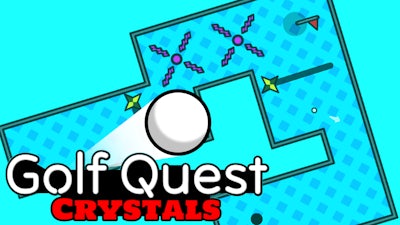


Golf Quest: Crystals drops you into a crisp 2D arena where every swing counts. Fifteen tightly designed levels littered with tricky obstacles test your precision. The goal? Guide a tiny ball from tee to hole without missing a beat. Speedrun mode adds a timer, so you can stack bragging rights on top of flawless shots. If you love tight puzzles, quick reflexes, and pure Golf thrills, this sequel delivers the punch you’ve been waiting for. Play now on Golf Quest: Crystals and see how far your skill can stretch.
Control the ball with simple mouse gestures. The system is built for fast learning and deep mastery.
Success hinges on three habits: anticipate, adjust, and avoid waste. First, study each layout before you swing. Spot the narrow gaps and the moving obstacles; they often dictate the only viable path. Second, fine‑tune your aim by dragging just enough to line up the ball with the sweet spot. Over‑dragging wastes power and can send you into a wall. Third, keep an eye on the timer in Speedrun mode. Short bursts of power can shave seconds off your run, but reckless shots will cost you retries. Master the bounce physics by letting the ball roll off walls at shallow angles – it can open hidden shortcuts. As you clear levels, new obstacle types appear, forcing you to adapt your approach. Keep the mouse steady, stay calm, and let each successful hole fuel your drive to beat the next record.
Ready to dominate the leaderboard? Jump into the action on Y8, where the community tracks top scores and shares killer tactics. Grab your mouse, aim tight, and crush every crystal‑filled course. The next great Golf triumph is just a click away.

We use cookies to help you navigate efficiently and perform certain functions. You will find detailed information about all cookies under each consent category below.
The cookies that are categorised as "Necessary" are stored on your browser as they are essential for enabling the basic functionalities of the site.
Necessary cookies are required to enable the basic features of this site, such as providing secure log-in or adjusting your consent preferences. These cookies do not store any personally identifiable data.
Functional cookies help perform certain functionalities like sharing the content of the website on social media platforms, collecting feedback, and other third-party features.
Analytical cookies are used to understand how visitors interact with the website. These cookies help provide information on metrics such as the number of visitors, bounce rate, traffic source, etc.
Advertisement cookies are used to provide visitors with customised advertisements based on the pages you visited previously and to analyse the effectiveness of the ad campaigns.
We also use third-party cookies that help us analyse how you use this website, store your preferences, and provide the content and advertisements that are relevant to you. These cookies will only be stored in your browser with your prior consent.
You can choose to enable or disable some or all of these cookies but disabling some of them may affect your browsing experience.