Click to play
x
Controls

Controls

Go back, close menu, open game menu

  • Keyboard - [ Esc / X / Numpad - ]
  • Gamepad - [ Cancel (East) ]

Click or press menu buttons

  • Keyboard - [ Submit (Enter) / Space ]
  • Gamepad - [ Submit (South) ]

Navigate menu buttons or sudoku board

  • Keyboard - [ WASD / Arrow keys ]
  • Gamepad - [ D-pad / Any stick ]

Switch focus between menu buttons and sudoku board

  • Keyboard - [ Ctrl / K / Numpad (/) ]
  • Gamepad - [ West / Select / Left shoulder]

Toggle pencil or note

  • Keyboard - [ Tab / N / Numpad + ]
  • Gamepad - [ North / Right shoulder ]

Input/note number in cell

  • Keyboard - [ Number or Numpad keys 123456789 ]

Erase/empty cell

  • Keyboard - [ Number or Numpad key 0 / Backspace ]

Pause game

  • Keyboard - [ ` / P / Numpad * ]
  • Gamepad - [ Start ]

Fullscreen / window mode

  • Keyboard - [ F11 ]
Shaolin Sudoku

Shaolin Sudoku

Shaolin Sudoku
Click to play
This game is not available on mobile.
rotate phone

Shaolin Sudoku – Mind‑Sharpening Puzzle Action

Sharp eyes, steady hands, and a calm mind win the day in Shaolin Sudoku. This 2D Sudoku title strips the genre down to pure logic, then wraps it in a sleek, monk‑inspired aesthetic. One player tackles three difficulty tiers, each allowing just a handful of mistakes before the board resets. Miss a number, feel the sting, and try again. The perfect blend of pressure and reward keeps you locked in for round after round.

Mechanics

Controls are simple, responsive, and work across keyboard, gamepad, or mouse. Master the layout and the puzzle flow becomes second nature.

  • Controls Go back, close menu, open game menu Keyboard - [ Esc / X / Numpad - ] Gamepad - [ Cancel (East) ]
  • Click or press menu buttons Keyboard - [ Submit (Enter) / Space ] Gamepad - [ Submit (South) ]
  • Navigate menu buttons or sudoku board Keyboard - [ WASD / Arrow keys ] Gamepad - [ D-pad / Any stick ]
  • Switch focus between menu buttons and sudoku board Keyboard - [ Ctrl / K / Numpad (/) ] Gamepad - [ West / Select / Left shoulder]
  • Toggle pencil or note Keyboard - [ Tab / N / Numpad + ] Gamepad - [ North / Right shoulder ]
  • Input/note number in cell Keyboard - [ Number or Numpad keys 123456789 ]
  • Erase/empty cell Keyboard - [ Number or Numpad key 0 / Backspace ]
  • Pause game Keyboard - [ ` / P / Numpad * ] Gamepad - [ Start ]
  • Fullscreen / window mode Keyboard - [ F11 ]
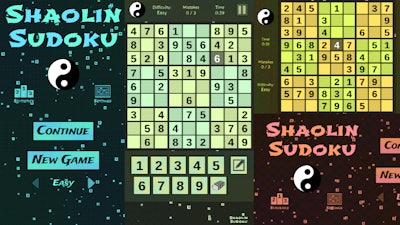
Shaolin Sudoku Gameplay

Strategy

Winning at Shaolin Sudoku isn’t just about brute‑force filling. Start with the obvious singles—cells that have only one possible digit. Then scan rows, columns, and 3×3 blocks for hidden pairs or triples. The pencil tool lets you tag potential numbers without committing, a lifesaver when the board tightens. As difficulty rises, the margin for error shrinks. Use the note system aggressively; a well‑placed pencil mark can expose a hidden elimination chain that clears a whole region.

Progression hinges on speed and accuracy. Each completed grid awards a time bonus, but every mistake chips away at your limited error pool. Train your eyes to spot the “only place” rule quickly: if a digit can only sit in one cell of a block, it belongs there, no matter what other numbers say. Over time, pattern recognition becomes instinctual, and you’ll breeze through even the toughest 1 Player challenges without breaking a sweat.

Y8’s clean UI ensures you stay focused on the numbers, not on clutter. The crisp 2D graphics highlight each cell, making it easy to differentiate between confirmed entries and pencil marks. Play in fullscreen for an immersive puzzle zone, or toggle windowed mode to keep an eye on your leaderboard ranking.

Ready to test your mental discipline? Jump into Shaolin Sudoku now, lock in those numbers, and prove you can master the ultimate Sudoku showdown.


Instructions:

Controls

Go back, close menu, open game menu

  • Keyboard - [ Esc / X / Numpad - ]
  • Gamepad - [ Cancel (East) ]

Click or press menu buttons

  • Keyboard - [ Submit (Enter) / Space ]
  • Gamepad - [ Submit (South) ]

Navigate menu buttons or sudoku board

  • Keyboard - [ WASD / Arrow keys ]
  • Gamepad - [ D-pad / Any stick ]

Switch focus between menu buttons and sudoku board

  • Keyboard - [ Ctrl / K / Numpad (/) ]
  • Gamepad - [ West / Select / Left shoulder]

Toggle pencil or note

  • Keyboard - [ Tab / N / Numpad + ]
  • Gamepad - [ North / Right shoulder ]

Input/note number in cell

  • Keyboard - [ Number or Numpad keys 123456789 ]

Erase/empty cell

  • Keyboard - [ Number or Numpad key 0 / Backspace ]

Pause game

  • Keyboard - [ ` / P / Numpad * ]
  • Gamepad - [ Start ]

Fullscreen / window mode

  • Keyboard - [ F11 ]
Customise Consent Preferences Close

We use cookies to help you navigate efficiently and perform certain functions. You will find detailed information about all cookies under each consent category below.
The cookies that are categorised as "Necessary" are stored on your browser as they are essential for enabling the basic functionalities of the site.

Always Active

Necessary cookies are required to enable the basic features of this site, such as providing secure log-in or adjusting your consent preferences. These cookies do not store any personally identifiable data.

Functional cookies help perform certain functionalities like sharing the content of the website on social media platforms, collecting feedback, and other third-party features.

Analytical cookies are used to understand how visitors interact with the website. These cookies help provide information on metrics such as the number of visitors, bounce rate, traffic source, etc.

Advertisement cookies are used to provide visitors with customised advertisements based on the pages you visited previously and to analyse the effectiveness of the ad campaigns.

We also use third-party cookies that help us analyse how you use this website, store your preferences, and provide the content and advertisements that are relevant to you. These cookies will only be stored in your browser with your prior consent.

You can choose to enable or disable some or all of these cookies but disabling some of them may affect your browsing experience.