Click to play
x
Controls

Controls

  • You cannot control the gunship itself, only aim its weapon systems
  • Use the mouse or keyboard arrow keys (or WASD keys) to aim
  • Press the left mouse button or spacebar to fire
  • Press the right mouse button or "Z" key to zoom in
  • Press the "X" key on your keyboard to switch the scan mode. This will allow you to see which enemy ships are armed with nuclear warheads
  • Once you unlock more weapons you can switch between them by using the scroll wheel on your mouse or using the 1, 2, 3, 4, 5 keys on your keyboard.
  • Press the Escape key on your keyboard to bring up the in-game menu
Starbase Gunship

Starbase Gunship

Starbase Gunship
Click to play
This game is not available on mobile.
rotate phone

Defend the Galaxy in Starbase Gunship

The galaxy is burning. Massive waves of hostile vessels are closing in on your position, and you are the only thing standing between total annihilation and survival. In Starbase Gunship, you take command of a high-tech turret system mounted on a critical Space station. This isn't just another casual shooter; it is a high-stakes Defense challenge that demands precision, cold nerves, and lightning-fast reflexes. Every second counts as enemy craft swarm your sector, turning the void into a chaotic battlefield. You need to hold the line, upgrade your arsenal, and prove that your station is an impenetrable fortress.

Precision is your greatest ally when facing an Alien threat of this magnitude. You do not control the gunship’s flight path; instead, you master the weapon systems to vaporize everything in your sights. The controls are designed for tactical dominance in this 3D environment:

  • Aim: Use the mouse, arrow keys, or WASD to lock onto targets.
  • Fire: Left mouse button or spacebar blasts your enemies into scrap.
  • Zoom: Right mouse button or the "Z" key brings distant threats into focus.
  • Scan Mode: Tap "X" to identify ships carrying nuclear warheads—prioritize these targets or face destruction.
  • Weapon Swap: Use the mouse scroll wheel or number keys 1-5 to cycle through your unlocked heavy weaponry.
  • Menu: Hit the Escape key to manage your settings mid-mission.
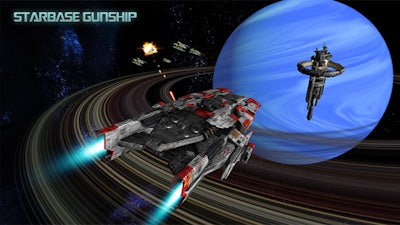
Starbase Gunship Gameplay

Success requires more than just holding down the trigger. You must manage your ammunition and target priority effectively. The most dangerous ships are those carrying nukes, so keep your scan mode active and clear the skies before they reach your station. As you rack up kills, you will unlock devastating new weaponry, allowing you to customize your loadout for maximum impact. The difficulty ramps up quickly, making every round a test of your ability to multitask under pressure. If you are looking for the best browser-based action, Starbase Gunship delivers that arcade-style intensity that keeps you coming back for just one more run.

Master the Skies with Y8

Are you ready to claim your place as the ultimate defender? The fate of the station rests entirely in your hands. Don't let the swarm overwhelm your systems. Put your skills to the test right now on Y8 and show those invaders why they should have picked a different sector to attack. Load your weapons, scan for threats, and dominate the leaderboard in this pulse-pounding shooter. Your station is waiting—start firing today.


Instructions:

Controls

  • You cannot control the gunship itself, only aim its weapon systems
  • Use the mouse or keyboard arrow keys (or WASD keys) to aim
  • Press the left mouse button or spacebar to fire
  • Press the right mouse button or "Z" key to zoom in
  • Press the "X" key on your keyboard to switch the scan mode. This will allow you to see which enemy ships are armed with nuclear warheads

  • Once you unlock more weapons you can switch between them by using the scroll wheel on your mouse or using the 1, 2, 3, 4, 5 keys on your keyboard.
  • Press the Escape key on your keyboard to bring up the in-game menu
Customise Consent Preferences Close

We use cookies to help you navigate efficiently and perform certain functions. You will find detailed information about all cookies under each consent category below.

The cookies that are categorised as "Necessary" are stored on your browser as they are essential for enabling the basic functionalities of the site.

Always Active

Necessary cookies are required to enable the basic features of this site, such as providing secure log-in or adjusting your consent preferences. These cookies do not store any personally identifiable data.

Functional cookies help perform certain functionalities like sharing the content of the website on social media platforms, collecting feedback, and other third-party features.

Analytical cookies are used to understand how visitors interact with the website. These cookies help provide information on metrics such as the number of visitors, bounce rate, traffic source, etc.

Advertisement cookies are used to provide visitors with customised advertisements based on the pages you visited previously and to analyse the effectiveness of the ad campaigns.

We also use third-party cookies that help us analyse how you use this website, store your preferences, and provide the content and advertisements that are relevant to you. These cookies will only be stored in your browser with your prior consent.

You can choose to enable or disable some or all of these cookies but disabling some of them may affect your browsing experience.