Controls
Blue Player Controls
- AD = move
- W = jump
- E = attack
- S = place blocks
Red Player Controls
- Left and right arrow keys = move
- Up arrow key = jump
- P = attack
- Down arrow key = place blocks
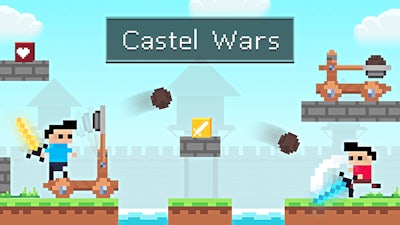


Two rivals, a crumbling fortress, and a handful of explosive catapults—this is the raw Battle that keeps gamers glued to the screen. Every match feels like a quick‑draw showdown where timing beats brute force. If you love fast‑paced retro Pixel action and love out‑maneuvering an opponent, you’ll be glued to the chaos from the first block placement.
Master the simple yet deadly command set and you’ll dominate the arena. Each side has its own key layout, so you can practice solo or jump straight into a heated 2 Player duel.
Movement is tight, jumps feel weighty, and attacks deliver instant feedback. Blocks act as both shield and platform—stack them wisely or watch your castle crumble.
Winning isn’t just about spamming attacks; it’s a test of Survival instincts. Start by securing the high ground—higher blocks give you a longer line of sight and force your foe to climb under fire. Keep an eye on your opponent’s block count; a low supply means they’ll be vulnerable to a well‑timed catapult shot. Mix melee strikes with ranged catapult launches to keep the pressure unpredictable. Remember, each destroyed block is a chance to rebuild a tighter defense, so never let the battlefield go static. The longer you stay alive, the more you’ll learn the rhythm of each player’s timing, turning every round into a deeper tactical puzzle.
Ready to claim the throne? Jump into Castle Wars on Y8 and prove you can out‑last every challenger. The castle awaits—grab your controls, place your blocks, and let the pixel‑fueled mayhem begin.

We use cookies to help you navigate efficiently and perform certain functions. You will find detailed information about all cookies under each consent category below.
The cookies that are categorised as "Necessary" are stored on your browser as they are essential for enabling the basic functionalities of the site.
Necessary cookies are required to enable the basic features of this site, such as providing secure log-in or adjusting your consent preferences. These cookies do not store any personally identifiable data.
Functional cookies help perform certain functionalities like sharing the content of the website on social media platforms, collecting feedback, and other third-party features.
Analytical cookies are used to understand how visitors interact with the website. These cookies help provide information on metrics such as the number of visitors, bounce rate, traffic source, etc.
Advertisement cookies are used to provide visitors with customised advertisements based on the pages you visited previously and to analyse the effectiveness of the ad campaigns.
We also use third-party cookies that help us analyse how you use this website, store your preferences, and provide the content and advertisements that are relevant to you. These cookies will only be stored in your browser with your prior consent.
You can choose to enable or disable some or all of these cookies but disabling some of them may affect your browsing experience.