Stack Ball Run 3D – The Arcade Sprint That Stacks Your Score
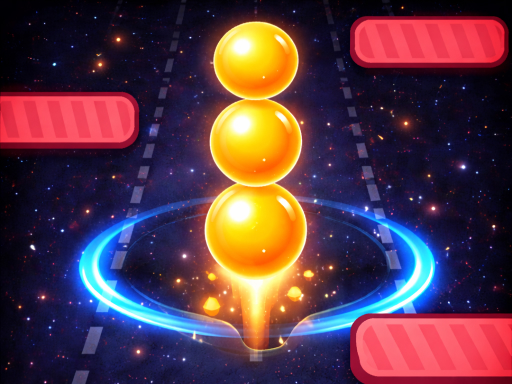
Fast‑paced, hyper‑casual, and endlessly addictive, Stack Ball Run 3D drops you into a neon‑lit runway where every swipe decides if you’ll crush a ball or crash into an obstacle. The goal is simple: collect spheres, build the tallest stack, and survive as long as possible. Miss a beat and your run ends—so why settle for a low score when the next high‑score leaderboard spot is just a flick away?
How to Play
Control the rolling sphere with razor‑sharp precision. Whether you’re on a mouse, touchscreen, or keyboard, the movement feels tight and responsive.
- Mouse Touch Drag left and right to move
- Keyboard Arrow Left Arrow Right or A D keys
Winning Strategies
Mastering Stack Ball Run 3D isn’t about random swipes; it’s about rhythm and foresight. Keep these tips in mind:
- Stay centered on the lane. Shifting too far left or right makes you miss the next ball and forces a risky recovery.
- Watch the obstacle pattern. Early sections are forgiving, but later runs throw tighter gaps that demand quick reflexes.
- Stack smart. Align each new sphere directly on top of the previous one to preserve balance; a crooked stack will tip over faster than a straight line.
- Boost your run with power‑ups. Some levels drop speed boosters or temporary shields—grab them before they vanish.
- Practice the timing of your drags. Short, sharp movements keep momentum high, while long sweeps waste precious seconds.
Progression is measured by distance traveled, not just the number of balls collected. As you push farther, the game ramps up speed, adds more complex obstacles, and introduces occasional “double‑stack” zones that double your points if you can survive the extra weight.
Ready to dominate the leaderboards? Play Stack Ball Run 3D now and prove you’ve got the reflexes to stack higher than anyone else. When the run ends, challenge friends on Y8 and see who truly owns the endless arcade crown.
Mouse Touch Drag left and right to move Keyboard Arrow Left Arrow Right or A D keys